

Download Frame Photo Editor – Photo Editor, Frame, Border, Mask, Image Enhancement, Digital Photography
Overview
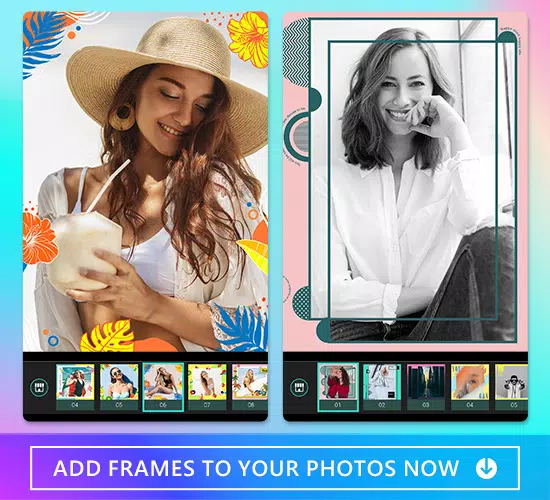
Frame Photo Editor is a specialized mobile application designed to enhance digital photographs by applying decorative frames, borders, and masks. The app aims to simplify the process of transforming ordinary images into visually striking, professionally styled compositions. Target users include casual photographers, social media content creators, and individuals seeking to elevate the aesthetic quality of their personal photo collections. Whether preparing images for online sharing, digital albums, or printed materials, Frame Photo Editor provides tools to achieve a polished look without requiring advanced editing skills. The app is developed by Frame Photo Editor, a dedicated software provider focused on accessible image enhancement solutions. While specific details about the developer’s background are not available, the app’s consistent feature set and stable functionality suggest a targeted approach to user experience. Real-world use cases include creating themed photo series for holidays, organizing family albums with a cohesive visual identity, or enhancing profile pictures for social platforms. In the broader app ecosystem, Frame Photo Editor fills a niche by combining simplicity with creative flexibility, offering a streamlined alternative to complex photo editing suites. Its focus on frame and border customization makes it a valuable tool for users who prioritize visual presentation over advanced retouching.Key Features & Functionality
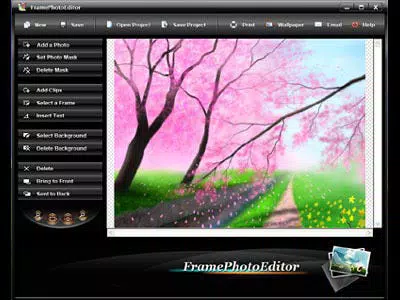
Frame Photo Editor delivers a suite of tools tailored to image styling and presentation. The app features an intuitive layout where core functions are accessible via a left-side menu, a top toolbar, and bottom navigation controls for zoom and fit. This structure ensures that users can quickly locate and apply enhancements without navigating through multiple layers. A wide variety of masks, frames, and borders are available, categorized into themes such as Seasonal, Cartoon, and Festival, enabling users to match their imagery to specific events or moods. Each category offers diverse shapes and styles, supporting creative expression across different contexts. The ability to create and save custom Projects allows users to maintain a consistent visual theme across multiple images—ideal for bloggers, influencers, or designers managing branded content. Advanced editing options include text insertion, background selection, image layering, and precise mask fitting with rotation controls, ensuring that focal points like faces are properly centered. The trial version provides full access to all features without time restrictions, though saved outputs include a watermark. This approach allows users to test the app’s capabilities thoroughly before purchasing. The combination of ease of use and creative flexibility makes Frame Photo Editor a practical choice for those who want to enhance their photos with minimal effort and maximum visual impact.Real-World Use Cases
- Creating holiday-themed photo albums with seasonal frames and borders.
- Designing consistent social media posts using saved Projects for brand cohesion.
- Enhancing portraits with artistic masks and text overlays for personal or professional portfolios.
- Preparing images for print or digital sharing with a refined, professional finish.
- Customizing group photos with themed borders to celebrate special occasions.
Interface, UX & Performance
The app’s user interface is designed with clarity and accessibility in mind. The layout follows a clean, modern structure with a vertical menu on the left, a top toolbar, and interactive controls at the bottom for zoom and image fit. This organization supports a logical workflow, allowing users to navigate between tools efficiently. Visual feedback is immediate, with changes applied in real time, enhancing the sense of control and creativity. Navigation is straightforward, with intuitive icons and labeled functions that reduce the learning curve for new users. Although the developer did not list formal performance metrics, the app’s lightweight file size of 12.5 MB suggests optimized resource usage, which likely contributes to smooth operation across various device categories. Responsiveness appears consistent, with minimal lag during frame selection and image manipulation. Stability is maintained through a streamlined feature set that avoids unnecessary complexity. The absence of reported crashes or freezes in available documentation indicates reliable operation under normal usage conditions. While compatibility with older devices was not specified, the app’s design suggests broad support across modern smartphones and tablets. Overall, the interface prioritizes usability without sacrificing functionality, making it suitable for both beginners and intermediate users seeking a polished editing experience.Platform Compatibility & Technical Requirements
Frame Photo Editor is available for Windows, as specified in the provided information. The app’s software version is 2.2.2, with a file size of 12.5 MB. The operating system requirements were not fully disclosed by the developer. Specific hardware or system specifications, such as minimum RAM or processor speed, were not listed. The developer did not provide additional technical details regarding compatibility with different device models or screen resolutions. Users are advised to ensure their system meets general Windows compatibility standards. The app’s compact size indicates efficient design, which may support performance on devices with limited resources. However, without formal requirements, users should rely on standard system guidelines when installing the software.Pros and Cons
- Intuitive layout with easy access to core editing tools.
- Extensive collection of themed frames, borders, and masks.
- Project saving feature for consistent visual branding.
- Full-featured trial version without expiration date.
- Lightweight file size supports efficient installation and operation.
- Watermark appears on images saved during the trial period.
- Developer did not specify minimum OS or hardware requirements.
- Limited information on device compatibility or performance on older systems.
- No built-in sharing or cloud integration features mentioned.
- Platform availability restricted to Windows only.
FAQ
Is Frame Photo Editor available for mobile devices?
Based on the provided information, Frame Photo Editor is currently available for Windows. The developer did not specify availability for Android or iOS platforms.
Can I use the trial version indefinitely?
Yes, the trial version is full-featured and does not have an expiration date. However, saved images will include a watermark.
What file formats does Frame Photo Editor support?
The supported file formats were not listed in the provided details. Users should refer to official documentation for format compatibility.
Is Frame Photo Editor secure to download?
The app is distributed as a shareware tool. While no security risks were reported, users should download from official sources to ensure authenticity and avoid third-party modifications.
How do I purchase the full version?
After testing the trial, users can purchase the full version directly from the developer’s official website. The price is listed as $29.95.


